
Counter that counts beats and measures
hi there.
something like this? it's in hh2, but those modules should be available in usine stage. it's more of a proof of concept, not sure about the bar led..but all necessary variables are available from the master sync module.
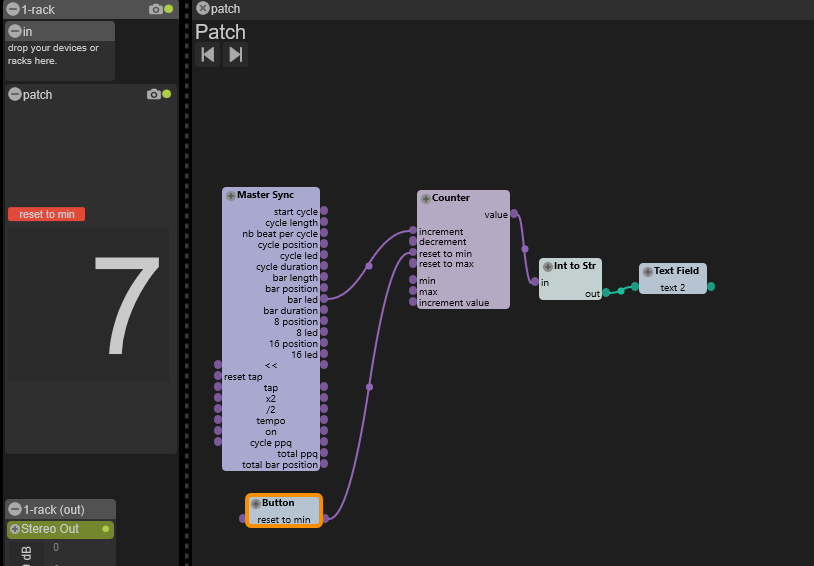
that's in Usine Stage
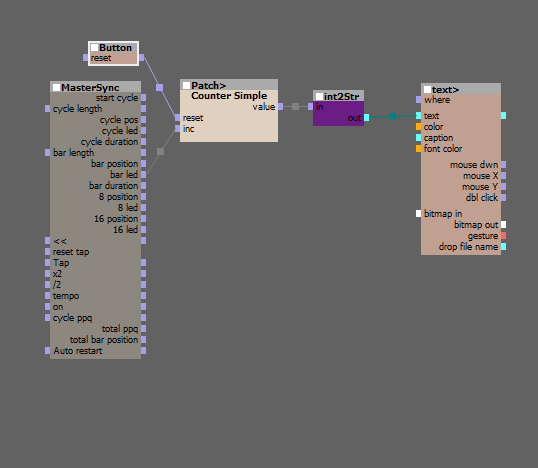
something like this? it's in hh2, but those modules should be available in usine stage. it's more of a proof of concept, not sure about the bar led..but all necessary variables are available from the master sync module.
that's in Usine Stage
Thank you very much Iococoi, I'll try it right away.
It works fine but I need two things:
1) Ability to set the number of bars that will be counting. I guess CYCLE LENGTH will do the job.
2) Make the counter to STOP when the number of bars set are reached and send a "1" value (when it stops) to activate a switch or button.
1) Ability to set the number of bars that will be counting. I guess CYCLE LENGTH will do the job.
2) Make the counter to STOP when the number of bars set are reached and send a "1" value (when it stops) to activate a switch or button.
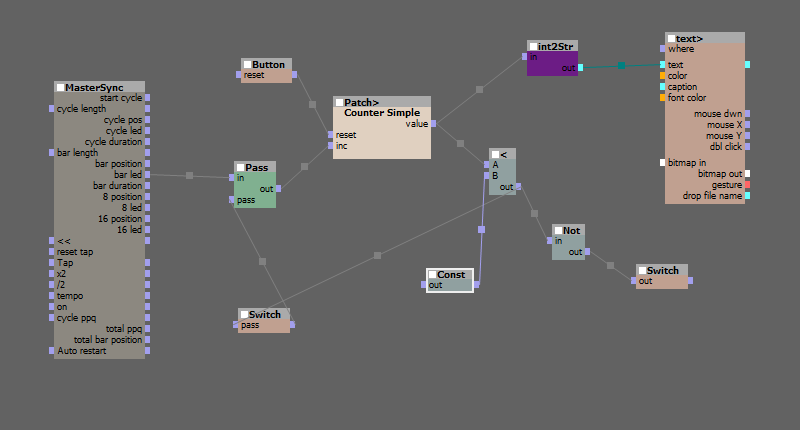
Const is for setting the bar count. The pass-Switch is just for visualization. It isn't particularly smart or sophisticated, but it seems to work.
alternatively can use cycle PPQ outputs that way it will auto reset/start synchro with usine cycle master timeline.
ie using PPQ Mod 4 to get beats and PPQ Div 4 to get bar number, then cycle led will pulse 1 at the end of chose cycle bar duration when restarting
ie using PPQ Mod 4 to get beats and PPQ Div 4 to get bar number, then cycle led will pulse 1 at the end of chose cycle bar duration when restarting
Ok guys, we're pretty close to the main idea but there're several things that need to be done:
1) I added an ON switch to the counter (to turn it ON and OFF). The counter has to stop counting when it reaches the parameter or length set by the CONST module which has a fader attached to its input named BEATS.
2) It is only possible to set the length of the counting by BEATS and not by BARS which is what I want. I know that it depends on the bars's length (numbers of beats in the bar) so I added a fader to set this parameter that might be helpful. 23fx23 mentioned something about PPQ outputs and using MOD and DIV modules but I really don't get the idea on how to use them.
3) I need the counter to be restarted (go to "0") when it finish counting.
4) Counter sends an static "1" value (switch type) when stops. In some cases a momentary "1" value (button type) is need it. Any way to achieve this? The better if it could have both options.
[img]http://www.sensomusic.com/forums/upload ... ounter.jpg[img/]
Thank you all for your help.
1) I added an ON switch to the counter (to turn it ON and OFF). The counter has to stop counting when it reaches the parameter or length set by the CONST module which has a fader attached to its input named BEATS.
2) It is only possible to set the length of the counting by BEATS and not by BARS which is what I want. I know that it depends on the bars's length (numbers of beats in the bar) so I added a fader to set this parameter that might be helpful. 23fx23 mentioned something about PPQ outputs and using MOD and DIV modules but I really don't get the idea on how to use them.
3) I need the counter to be restarted (go to "0") when it finish counting.
4) Counter sends an static "1" value (switch type) when stops. In some cases a momentary "1" value (button type) is need it. Any way to achieve this? The better if it could have both options.
[img]http://www.sensomusic.com/forums/upload ... ounter.jpg[img/]
Thank you all for your help.
I'm having trouble uploading files. I guet this error message trying to download the file
Bad request. The link you followed is incorrect or outdated.
Bad request. The link you followed is incorrect or outdated.
this is a simple exemple using ppq output, div and mod modules to get current beat and bar of usine timeline:

PPQ outputs the current float beat, AmodB if using B= 4 will make beat if ie entering 0,1,2,3,4,5,6,7... display on output 0,1,2,3 and reset to 0,1,2,3 and so on. (restart at modulo 4)
A div B if using 4 will display bar (assuming bar made of 4 beats) so from 0 to 3 we are in bar 0, 4 to 8 bar 1 ect... basically a division but with integer value.
but in your case i reckon it can look more complex than a 'classic' counter cause tried to get all the needed features at once (if i well understood) and it's more webby than i thought^^
basically set Max Number of bars to count on the fader, press reset, it will count beats and bars until max is reached then reset to 0, the led will output constant 1 as stoped (the from 0 to 1 will send only momentary pulse), then when you press reset back will restart counting and so on.

so better look at iococoi suggestion wich will be simpler i guess..
PPQ outputs the current float beat, AmodB if using B= 4 will make beat if ie entering 0,1,2,3,4,5,6,7... display on output 0,1,2,3 and reset to 0,1,2,3 and so on. (restart at modulo 4)
A div B if using 4 will display bar (assuming bar made of 4 beats) so from 0 to 3 we are in bar 0, 4 to 8 bar 1 ect... basically a division but with integer value.
but in your case i reckon it can look more complex than a 'classic' counter cause tried to get all the needed features at once (if i well understood) and it's more webby than i thought^^
basically set Max Number of bars to count on the fader, press reset, it will count beats and bars until max is reached then reset to 0, the led will output constant 1 as stoped (the from 0 to 1 will send only momentary pulse), then when you press reset back will restart counting and so on.
so better look at iococoi suggestion wich will be simpler i guess..
This one only count bars and use counter so should be easier to understand

the bar pulse of master sync increments the counter,
when output of counter bar nb equals max wanted, from 0 to 1 it
sends a pulse. that pulse reset the counter to 0, and also
affects 0 to the increment value, so counter stops incrementing.
When pressing reset, multiple variable module affects 1 back
to increment value so counter restarts counting back.
(if want a swich with constant 1 when stop and 0 when counting just add an invert out of multivar)
edit: in usine V5 and stage i guess you can replace counter by a simple fader, just set fader max value high enough

patch_for_v5
the bar pulse of master sync increments the counter,
when output of counter bar nb equals max wanted, from 0 to 1 it
sends a pulse. that pulse reset the counter to 0, and also
affects 0 to the increment value, so counter stops incrementing.
When pressing reset, multiple variable module affects 1 back
to increment value so counter restarts counting back.
(if want a swich with constant 1 when stop and 0 when counting just add an invert out of multivar)
edit: in usine V5 and stage i guess you can replace counter by a simple fader, just set fader max value high enough
patch_for_v5


This is the one that worked as spected. I'll do some improvements to meet my needs. I wonder if it is possible to do some modifications to make it work with odd meters ie: 7/8.23fx23 wrote:this is a simple exemple using ppq output, div and mod modules to get current beat and bar of usine timeline:
http://www.sensomusic.org/forums/upload ... d_bars.jpg
PPQ outputs the current float beat, AmodB if using B= 4 will make beat if ie entering 0,1,2,3,4,5,6,7... display on output 0,1,2,3 and reset to 0,1,2,3 and so on. (restart at modulo 4)
A div B if using 4 will display bar (assuming bar made of 4 beats) so from 0 to 3 we are in bar 0, 4 to 8 bar 1 ect... basically a division but with integer value.
but in your case i reckon it can look more complex than a 'classic' counter cause tried to get all the needed features at once (if i well understood) and it's more webby than i thought^^
basically set Max Number of bars to count on the fader, press reset, it will count beats and bars until max is reached then reset to 0, the led will output constant 1 as stoped (the from 0 to 1 will send only momentary pulse), then when you press reset back will restart counting and so on.
http://www.sensomusic.org/forums/upload ... _reset.jpg
so better look at iococoi suggestion wich will be simpler i guess..
Thanks a lot to all you guys. You're masters...
Sorry guys for bothering you again. Counter is working fine but I need a way to STOP the counter manually, reset it to "0" and stay OFF until next click on RESET/PLAY button.
just add a "manual stop button" and wire it to already existing patch as below:

It certainly stops the counter but with "1" value from the LED is sent and remains lit. Any whay to get it to "0" when you stop the counter manually?23fx23 wrote:just add a "manual stop button" and wire it to already existing patch as below:
http://www.sensomusic.org/forums/upload ... d_stop.jpg
ok so if well understood the led should swich on at counter 'normal' end (previous request) , but not if was stoppped manually, that's it?
If so this one should do the job, patched a bit differently, more logical than previous where the 'counter end check' was not very smart in fact.

patch for V5:
Counter_bars_Usine5
If so this one should do the job, patched a bit differently, more logical than previous where the 'counter end check' was not very smart in fact.
patch for V5:
Counter_bars_Usine5
Who is online
Users browsing this forum: No registered users and 54 guests