value
value
show value
Shows the value for this control.
 Option ON and OFF on a fader.
show symbol
Shows the symbol.
show value and symbol on click
Displays the value and symbol only when selecting or interact with the mouse.
 Example on a fader.
hint value on mouse down
When ON, display the hint only when the mouse is down on the control.
edit with simple click
When ON, the edition on the value is possible with a simple click, instead of a double click.
display array values
When the input of a fader is an array, displays the value as a list of array elements (ON) or only the first array value (OFF).

 Option ON and OFF on a fader.
value align
Value alignment, left, center or right.
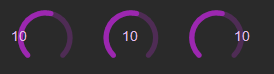 Example on a knob.
value font bold
Bold style for the value font.
 Example knob.
value font color
Color of the value font.
 Example with a Green and a Red value on a knob.
value font size factor
Size factor of the value font.
 *Example with 2 different values on a knob.
value align
Value horizontal alignment, center, top, bottom.
value V align
Value vertical alignment, center, top, bottom.
 Example on knob (Center, top and bottom)
show poly order
Show the order of a voice in a polyphonic sub-patch.
version 6.0.241021
Edit All Pages