Popup window does not stay in place when reloading patch. No matter what I do, when I reload the patch popup window appears in another position and not centered in the display or in the position I want. What's wrong. Is there any way to set its position permanently?
Thanks.

POPUP WINDOW POSITION
-
sm_jamieson
- Member
- Posts: 559
You can set its position by connecting something to the position input parameters - a "constant" module for example. If you find Usine still overrides these, you may need something to send its position repeatedly, or a delay before the value is first sent on patch opening. A simple script to output the values required a short while after the patch is initialised might be the best way.
-
Ariajazz
- Member
- Posts: 353
Thanks for replying. I get the idea but not sure how to do it. Older versions of Usine did "remember" the position of popup windows and containers. Could you please be a little bit more explanatory on how to get it. BTW there's no way to set containers as stand alone in Hollyhock, the option it just not available on the drop down menu. Thats why I using popup windows instead.
Thank you.
Thank you.
-
iococoi
- Member
- Posts: 211
hi,
i was trying a few things, put it's somewhat inconsistent..constant sets the actual position..this could be either absolute(px) via left/top or relative(0..1) via position x/position y..those on activation/on initialization-modules should fire(1) on loading/activating the patch..you don't need them both..the pass module should work kind of an if-then-clause..if activation then let constant value pass through( set position)..put something isn't quite right..you might want to give it a try..
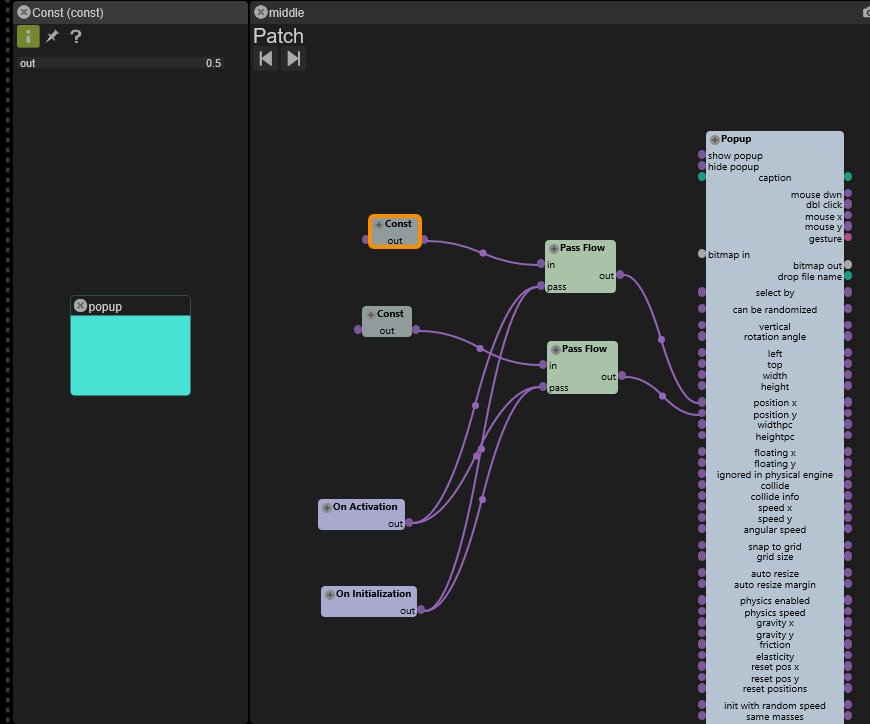
i was trying a few things, put it's somewhat inconsistent..constant sets the actual position..this could be either absolute(px) via left/top or relative(0..1) via position x/position y..those on activation/on initialization-modules should fire(1) on loading/activating the patch..you don't need them both..the pass module should work kind of an if-then-clause..if activation then let constant value pass through( set position)..put something isn't quite right..you might want to give it a try..
-
woodslanding
- Member
- Posts: 1327
Okay, the way to do it. I had one popup that was showing in an annoying position by default....
Wire as above, but you have move the popup AFTER it's been opened. Take a wire from your OPEN button (I assume you have one?) run through a WAIT1 and into the two PASS modules. Works like a charm.
Also, for more precision use TOP and LEFT to position. Note that if you drag constants from the TOP and LEFT inputs, they do NOT take the values of TOP and LEFT, but default to zero.
HTH
-eric
Wire as above, but you have move the popup AFTER it's been opened. Take a wire from your OPEN button (I assume you have one?) run through a WAIT1 and into the two PASS modules. Works like a charm.
Also, for more precision use TOP and LEFT to position. Note that if you drag constants from the TOP and LEFT inputs, they do NOT take the values of TOP and LEFT, but default to zero.
HTH
-eric
Custom Ryzen 5900x MATX build, Win10, Fireface UFX, touchscreen
Custom 2 manual midi keyboard
Usine, Kontakt, Reaktor, Synthmaster, Byome, Arturia, Soundtoys, Unify
Custom 2 manual midi keyboard
Usine, Kontakt, Reaktor, Synthmaster, Byome, Arturia, Soundtoys, Unify
-
woodslanding
- Member
- Posts: 1327
Okay, didn't test that enough. Here's a solution that works:
OPEN BUTTON ---> [1-X] ---> [*] --> LEFT
---> [*] ---> TOP
put your constants for position as the other inputs to the [*] modules. This way the position gets zeroed when the button is pressed, and moved to your desired position when it is released. No need for a wait1.
I think the PASS was not working because no new value got sent.....
OPEN BUTTON ---> [1-X] ---> [*] --> LEFT
---> [*] ---> TOP
put your constants for position as the other inputs to the [*] modules. This way the position gets zeroed when the button is pressed, and moved to your desired position when it is released. No need for a wait1.
I think the PASS was not working because no new value got sent.....
Custom Ryzen 5900x MATX build, Win10, Fireface UFX, touchscreen
Custom 2 manual midi keyboard
Usine, Kontakt, Reaktor, Synthmaster, Byome, Arturia, Soundtoys, Unify
Custom 2 manual midi keyboard
Usine, Kontakt, Reaktor, Synthmaster, Byome, Arturia, Soundtoys, Unify